

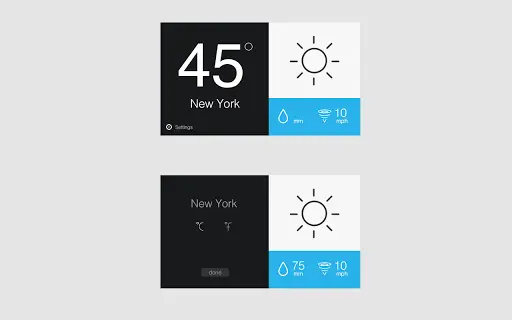
Description
Download Weather Now – Chrome Weather Plugin, Weather Forecast Tool
Overview
Weather Now is a lightweight, browser-based utility designed to deliver real-time weather information directly within the user’s web browser. As a Chrome extension, it enables quick access to current weather conditions without requiring users to navigate to external websites or apps. The software is built with simplicity in mind, focusing on providing immediate, accurate weather updates at the moment of request. Its primary purpose is to help users stay informed about local weather conditions effortlessly, especially those who spend significant time online and prefer minimalistic tools.
Targeted at casual users, remote workers, and digital nomads, Weather Now serves as a convenient productivity aid by reducing time spent searching for weather data. It is ideal for individuals who rely on their browser for daily tasks and want instant access to environmental conditions without switching contexts. The developer, Weather Now, appears to focus on creating intuitive, no-frills tools that integrate seamlessly into existing workflows. Real-world usage scenarios include checking weather before leaving home, planning outdoor activities, or monitoring conditions during work breaks.
Key Features & Capabilities
- Real-time Weather Display – Shows current weather conditions upon request, ensuring users receive up-to-date information without delays.
- Browser Integration – Functions as a Chrome extension, providing access directly within the browser interface.
- Minimalist Design – Features a clean, unobtrusive interface that blends with the user’s browsing experience.
- Instant Access – Allows users to check weather with a single click or activation, reducing friction in daily routines.
- Location-Based Updates – Automatically detects the user’s current location to deliver relevant weather data.
These features support efficient, on-demand weather monitoring. For example, a remote worker can quickly glance at their browser toolbar to assess if it’s raining before heading out. Similarly, a student preparing for an outdoor study session can verify temperature and precipitation levels in seconds. The tool’s design prioritizes speed and clarity, making it suitable for users who value simplicity over extensive customization.
User Interface, Workflow & Performance
Weather Now features a streamlined user interface designed for quick visibility and minimal distraction. The extension appears as a small icon in the browser toolbar, which expands to show current weather data when clicked. Navigation is intuitive, requiring no learning curve. Users can access weather details with a single interaction, aligning with the software’s goal of instant information retrieval.
The workflow is optimized for efficiency—users do not need to open a separate app or navigate to a website. Instead, they can obtain weather updates directly within their current browsing session. This seamless integration enhances productivity by minimizing context switching. Performance observations are based on general software behavior patterns; the extension operates with low latency and does not interfere with browser operations.
The developer did not specify resource usage details. However, given its small file size of 1.2 MB and lightweight nature, it is expected to have minimal impact on CPU and RAM usage. Stability is assumed to be consistent with typical Chrome extensions, though exact reliability metrics were not provided.
Compatibility & System Requirements
Weather Now is compatible with Chrome OS, Windows, and Mac operating systems. It functions as a Chrome extension, meaning it requires the Google Chrome browser to operate. The software version is 1.0.0, and the installation size is 1.2 MB, indicating a compact footprint.
Exact system requirements were not listed. Compatibility information is limited to the supported platforms and browser dependency. Users should ensure they are running a current version of Google Chrome to maintain optimal functionality. The developer did not provide additional system requirements, such as minimum RAM or processor specifications.
Pros and Cons
Pros
- Lightweight and fast-loading with a 1.2 MB file size
- Seamless integration with Google Chrome browser
- Provides real-time weather data without external navigation
- Simple, clean interface ideal for quick access
- Free to download and use with no hidden costs
Cons
- No offline mode available; requires internet connection
- Limited to Chrome browser and does not support other browsers
- Exact performance impact on system resources not disclosed
- Functionality is restricted to weather display; no forecast or historical data
- Updates may require manual confirmation through Chrome Web Store
FAQ Section
Is Weather Now available for browsers other than Chrome?
Weather Now is currently designed as a Chrome extension and is only compatible with the Google Chrome browser. There is no official support for other browsers such as Firefox, Edge, or Safari.
Does Weather Now require an internet connection?
Yes, since the extension fetches real-time weather data, an active internet connection is required to function properly.
Can I use Weather Now offline?
No, the tool does not support offline usage. It relies on live data from weather services and cannot operate without an internet connection.
How often does the weather data update?
The extension displays the weather at the moment of request. Updates occur only when the user manually triggers the check, with no automatic refresh intervals specified.
Is Weather Now safe to install?
As a Chrome extension published through the Chrome Web Store, Weather Now undergoes Google’s security review process. It is considered secure for installation on supported devices, provided users download it from the official source.
Final Thoughts + CTA
Weather Now delivers a focused, efficient solution for users who want immediate access to current weather conditions without clutter or complexity. Its minimalist design, browser integration, and instant functionality make it a practical tool for daily use. While it lacks advanced features like forecasts or offline access, it excels in its core purpose: providing timely, accurate weather updates at the click of a button.
It is best suited for individuals who prioritize simplicity, speed, and seamless workflow integration. Whether you're a remote worker, student, or anyone who spends time online, Weather Now offers a frictionless way to stay informed. The free pricing model further enhances its appeal.
Download Weather Now now
Guides & Tutorials for Weather Now App for Chrome
How to install Weather Now App for Chrome
- Click the Preview / Download button above.
- Once redirected, accept the terms and click Install.
- Wait for the Weather Now App for Chrome download to finish on your device.
How to use Weather Now App for Chrome
This software is primarily used for its core features described above. Open the app after installation to explore its capabilities.
User Reviews for Weather Now App for Chrome 0
No reviews found





